


Toolr: Time Clock Calculator
3.329.00 Reviews
App Specs
- Version
- 3.1.2
- Updated On
- License
- Free
- Downloads
- 50,000+
- Developer
- Toolr, Inc.
- Categories
- Business
- Platform
- Android
Screenshots
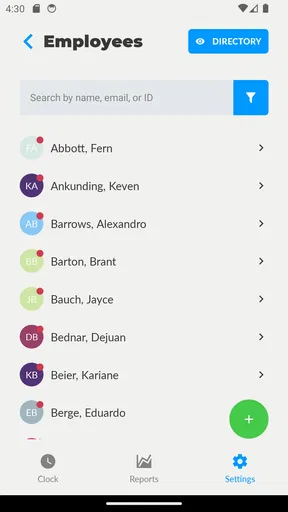
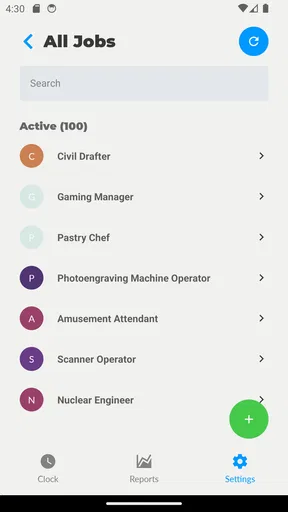
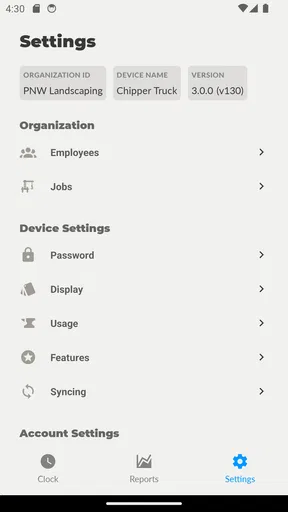
 Analysis by AppCompare
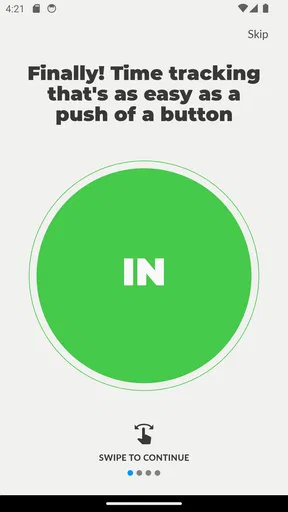
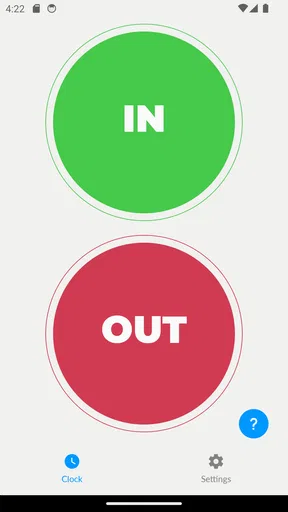
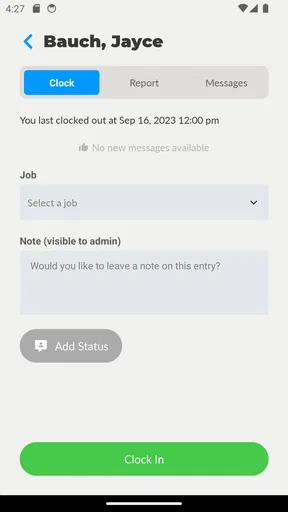
I spent time with Toolr: Time Clock Calculator as a simple business app for recording work time, and its appeal became clear almost immediately: it tries to turn clocking in and out into a quick habit rather than a full administrative task. The main idea is straightforward. You open the app, tap when your shift begins, tap again when it ends, and use the recorded time to understand your working hours. For someone who wants a lightweight employee time card on a phone, that direct approach can be useful.
At the same time, this is not the kind of tool I would automatically recommend to every workplace. A time clock becomes valuable only when it fits the way a person actually works. Connectivity, phone access, forgotten taps, and the need to review or share records all matter more than the short store summary suggests. My experience is that Toolr works best when one person wants a fast personal record, while larger teams or businesses with formal payroll requirements may need a more complete system.
How the time clock feels in everyday work
The app belongs to the business category and is developed by Toolr, Inc. It is free to install, with optional in-app purchases ranging from $9.99 to $349.99 per item. That pricing detail is worth keeping in mind before introducing it to a team, because “free” describes the starting point rather than necessarily the complete cost of using every available option.
The central workflow is easy to understand. When I imagine using it at the start of a shift, the useful part is the lack of ceremony: I do not need to build a complicated project, select several categories, or turn a basic clock-in into a planning exercise. The same simplicity helps at the end of a shift, when I may be tired and simply want to stop the timer accurately.
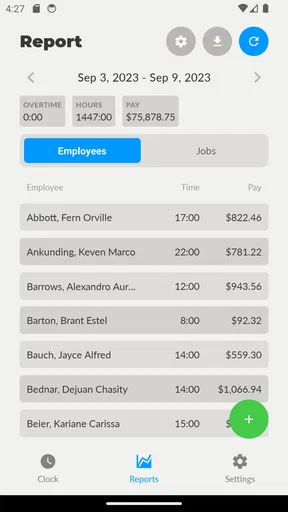
That simplicity is also the first trade-off. A small business may want employee schedules, approvals, payroll preparation, detailed reporting, or several levels of access. Toolr: Time Clock Calculator should be approached as a focused time-recording tool rather than assumed to be a complete workforce management platform. If your needs begin and end with tracking hours, its narrow purpose is a strength. If you need a shared administrative system, you should test the workflow carefully before relying on it.
Why the mobile setting matters
A phone-based clock is most useful when work does not happen at a desk. I can see the value for a cleaner moving between appointments, a contractor arriving at different sites, a part-time worker starting a shift away from a computer, or a small shop owner who wants a quick personal record. In these situations, the phone is already nearby, and a one-tap action is less disruptive than writing down times and reconstructing them later.
There is a practical habit I would recommend: open the app before beginning the workday and make the clock-in part of the same routine as putting on a badge, unlocking a vehicle, or checking the first assignment. At the end of the shift, stop the clock before packing away the phone. This sounds obvious, but time tracking fails more often through forgotten actions than through difficult interfaces.
Worth Reading Before You Choose

EA SPORTS FC Mobile 26 Is a Bigger Football Game, but It Takes Time

Flipboard Shows What News Apps Must Do Beyond the Feed

Switching to Android Auto Means Rethinking Your Driving Routine

Google Calendar Makes a Crowded Week Easier to Manage

Ludo King Makes the Most of the Minutes Between Plans

Baby Panda World Brings Quick Play to Modern Phones, but Its Game Library Feels Busy
The mobile context also creates pressure. A phone can be in a pocket, low on battery, muted, or buried under other work. If a user expects the app to compensate for every interruption, a simple tap-based clock may feel less dependable than a formal attendance system with workplace procedures around it. I would use it alongside a clear team habit, not as a substitute for one.
Connectivity changes the experience
Network conditions are an important part of the real-world experience. The app is designed around quick actions, so any delay caused by a weak connection can make a supposedly instant clock-in feel uncertain. In a basement, warehouse, rural property, or crowded event venue, I would not want an employee guessing whether a tap was accepted.
I am careful not to treat the app as an offline timekeeping solution without explicit confirmation. Instead, I would test it in the exact places where staff will use it: inside the workplace, outside at a job site, in a vehicle before leaving, and in areas with unreliable mobile service. The key question is not merely whether the screen opens, but whether the recorded action remains visible and trustworthy when the connection changes.
This makes connectivity part of the operating procedure. A manager could ask workers to check the latest visible status after clocking in, while employees could note the time temporarily if the app behaves unexpectedly. That backup does not make the app worse; it reflects the reality that a phone-based record should not be the only memory of a shift until the team knows how it behaves in its own environment.
A realistic shift scenario
Imagine a mobile repair worker who starts the day at a customer’s property rather than at a central office. The worker opens Toolr before beginning, clocks in, completes several visits, and clocks out after returning to the vehicle. The app’s value is the reduced mental load: there is no need to reconstruct the start and finish from memory at night.
Now add a weak signal at the first property and a rushed departure at the final one. The worker may wonder whether the first tap registered or forget the final tap completely. In that scenario, the app still offers a useful routine, but the surrounding process matters. I would have the worker review the entry immediately when possible and keep a simple note of unusual interruptions. That small discipline is more valuable than pretending a digital time card eliminates human error.
For a small team, I would also agree in advance on what counts as a correction. If someone forgets to clock out, should they write down the actual finish time, notify a supervisor, or amend the record later? Toolr can support the basic habit, but the business still needs a fair method for resolving mistakes. This is one of the less obvious trade-offs of a minimal time clock: fewer screens mean faster use, but they may also leave more responsibility with the people using it.
Failure, forgotten taps, and recovery
The most important test for any time clock is not the perfect shift. It is the imperfect one. Phones get locked, users rush between tasks, and connections change. Before depending on Toolr for payroll or disputes, I would deliberately test a few failure situations with a noncritical record: clock in, close the app, move into a poor-signal area, reopen it, and check what the user can understand from the visible record.
I would also test a missed clock-out and an accidental tap. The recovery experience matters because a time record that cannot be corrected cleanly may create more work than a handwritten note. A good workplace procedure should identify who reviews questionable entries and how the correction is documented. That is especially important when several employees share the same process, because inconsistent corrections can damage trust even when the original mistake was harmless.
My advice is to avoid treating the app as a silent authority. Compare the recorded time with the person’s actual shift during the early trial period. If the app and the employee’s note disagree, investigate the reason rather than automatically accepting one side. This approach is useful for any digital clock, but it is particularly sensible with a focused mobile tool whose main promise is speed rather than a complete audit framework.
Recovery should also include the phone itself. If a device is lost, replaced, or unavailable, the user needs a temporary way to record hours. I would establish that backup before the first important pay period. A paper note, a shared workplace procedure, or another approved record can bridge the gap. The point is not to undermine Toolr; it is to prevent a single unavailable phone from becoming a missing shift.
Using it without wasting mobile data
Time tracking should not require constant attention to the network. Because the app is used for short actions rather than long sessions, I would avoid repeatedly opening it just to check whether a tap worked. That creates unnecessary uncertainty and may encourage workers to interact with the app more than needed. A better routine is to open it for the start and end actions, confirm the visible result, and leave it alone while working.
For people with limited mobile data, the sensible approach is to test the application on Wi-Fi first and then observe how it behaves during ordinary use. I would not assume that every record is stored locally or that synchronization happens later unless the app clearly demonstrates that behavior. The safest practice is to use a stable connection for setup and review, then keep a temporary note when working in places where connectivity is unpredictable.
This is also where privacy-conscious use matters. A time record can reveal a person’s working pattern, even when it contains no detailed project information. I would limit access to the phone and account according to the workplace’s normal rules, avoid sharing screenshots casually, and decide who is responsible for reviewing records. Those are practical safeguards, not reasons to avoid the app, but they should be part of the decision when employees use personal devices.
What the version and audience suggest
The current version is 3.1.2, and the app runs on Android seven point zero or later. That makes it relevant to people using older Android phones, which can be helpful for small businesses that do not replace devices frequently. I would still check the actual phones used by staff rather than relying only on the minimum operating-system requirement, especially if the workplace depends on older hardware or unusual network conditions.
The content rating is Everyone, so the app is presented as suitable for a broad audience. In practical terms, that matches its business purpose: it is not built around specialized professional knowledge. A new employee should be able to understand the basic clock-in and clock-out idea quickly. The harder part is not learning the buttons; it is establishing dependable habits and deciding how the records will be checked.
The app has passed the fifty-thousand-install mark, with an average rating of three point three from ninety-one ratings and twenty-nine written reviews. I read that overall response as mixed rather than decisive. It suggests that some people find the basic concept useful, while others may encounter limitations or expectations that the simple workflow does not meet. I would treat the rating as a reason to test the app in context, not as a final verdict.
Who should choose it, and who should look elsewhere
I would recommend Toolr to an individual worker, freelancer, owner-operator, or very small team that mainly needs quick start-and-stop records. It is particularly appealing when a full scheduling platform would be excessive and when people are comfortable following a simple manual routine. The free starting price also makes it easy to evaluate without committing immediately to a larger system.
I would be more cautious for companies that need payroll-ready reporting, formal approvals, location verification, complex breaks, multiple departments, or a strong administrative history. In those cases, a dedicated workforce platform may be a better choice even if it takes longer to learn. A spreadsheet can also be preferable for a tiny operation that needs custom calculations and already has a reliable process, although spreadsheets depend heavily on careful manual entry.
The in-app purchase range deserves a close look before a business rolls the app out widely. A single person experimenting with the basic experience has a different cost question from a company equipping many workers. I would identify exactly which functions the team needs, check the purchase screen on the intended devices, and calculate the total cost before promising employees that the system will remain free.
My connectivity verdict
Toolr: Time Clock Calculator is at its best when the user’s needs are narrow and the working environment is predictable. Its one-tap style suits mobile work, and the straightforward design can make clocking in and out easier to remember than a paper sheet or an elaborate business platform. I like it as a low-friction starting point for personal or small-scale time tracking.
My reservation is not about the basic idea; it is about relying on a simple phone workflow without testing the difficult moments. Weak connectivity, forgotten taps, device problems, and unclear correction rules can all affect the value of a time record. The smartest way to use this app is to pair its quick taps with a clear recovery routine.
Overall, I would try it for a small operation before considering a more expensive system, especially if the team works in places with dependable service and only needs straightforward hours. I would skip it as the sole foundation for complex payroll or compliance work. For the right user, Toolr is a practical little business app; for everyone else, its simplicity may become the very limitation that sends them toward a fuller alternative.
Pros
- Quickly calculates total hours from clock-in and clock-out times.
- Supports break deductions for more accurate shift totals.
- Useful for freelancers
- employees
- and small business owners.
- Simple interface makes routine time calculations easy to repeat.
- Helps reduce mistakes when adding multiple work periods manually.
Cons
- May lack advanced scheduling and employee management features.
- Users may need to enter each shift manually.
- Limited reporting options could be inconvenient for payroll tracking.
- Time calculations may require careful attention for overnight shifts.
- Not a replacement for dedicated attendance or payroll software.
FAQs for Toolr: Time Clock Calculator
What is Toolr: Time Clock Calculator used for?
Toolr: Time Clock Calculator is designed to help users calculate working hours, shift durations, breaks, overtime, and total time between clock-in and clock-out entries. It can be useful for employees tracking their schedules, freelancers preparing invoices, students managing part-time jobs, or anyone who needs a quick and convenient way to perform time-related calculations without relying on manual arithmetic.
Can Toolr calculate breaks, overtime, and multiple work periods?
Yes, Toolr is intended for more than a simple start-and-end time calculation. You can generally use it to account for unpaid breaks, separate work periods, and overtime when reviewing a shift. This makes the app practical for irregular schedules or split shifts. However, users should still check the results against their employer’s overtime policy, rounding rules, and local labor regulations.
Is Toolr: Time Clock Calculator suitable for tracking payroll or invoicing?
Toolr can be helpful when estimating payable hours or preparing a basic record for payroll and freelance invoices. It provides a convenient way to review the time worked and calculate totals before entering them into another system. Nevertheless, it should not automatically be treated as an official payroll platform, because tax deductions, different pay rates, holidays, and company-specific rules may require additional calculations.
Does Toolr require an internet connection or an account?
For basic time calculations, Toolr is generally expected to work as a lightweight utility without requiring a complicated setup. Depending on the current version, certain features such as synchronization, saved records, advertisements, or optional services may behave differently. Before relying on it for long-term records, check the app’s permissions, privacy information, and whether your calculations are stored locally or connected to an online account.
Is Toolr: Time Clock Calculator easy to use for beginners?
The app is built around a straightforward purpose, so most users should be able to enter times and understand the resulting totals without extensive instructions. Its value is especially clear for people who frequently calculate shifts manually and want to reduce mistakes. Even so, users with overnight shifts, unusual break arrangements, or several pay rates should test a few examples first to confirm that the displayed results match their expectations.


